How to Set Up AutoDM for Myntra Glam Clan (Step-by-Step Guide)
Myntra Glam Clan offers up to 12% affiliate commission-but no AutoDM or creator tools. Use Vyral to automatically send your Myntra links in Instagram DMs when someone comments on your Reel.
If you're a Myntra Glam Clan creator, you've probably experienced this. Your Reel starts getting hundreds of comments: "Link please," "Where can I buy this?" "Price?" "Dress link."
That engagement matters-Glam Clan can pay up to 12% affiliate commission on eligible fashion sales. But there's a gap: Myntra does not provide AutoDM or any other creator tools to turn those comments into clicks. You get the commission program; you still need a way to deliver product links at the moment someone asks.
Instagram AutoDM fills that gap. Instead of manually replying to every comment, you automatically send your Myntra affiliate links in Instagram DM-one of the easiest ways to protect up to 12% commissions while saving hours every week.
In this guide, we'll show you exactly how to set up AutoDM for Myntra Glam Clan using the Vyral Creator App. New to the program? Start with how to earn from Myntra Glam Clan or our earnings guide.
What Is Instagram AutoDM?
Instagram AutoDM automatically sends a direct message whenever someone comments on your Reel.
For Myntra Glam Clan creators, this means:
- Viewer comments "LINK"
- Vyral instantly sends your Myntra affiliate link
- Viewer opens the product
- You earn up to 12% Glam Clan commission if they purchase
Myntra pays the commission; it doesn't provide AutoDM. Vyral delivers the link instantly-while interest is still high.
Why Myntra Glam Clan Creators Should Use AutoDM
Myntra Glam Clan is strong on the money side: creators can earn up to 12% commission on eligible sales. What it does not give you is AutoDM, product cards in Instagram DMs, comment matching, or other creator tools. Without those, every "link please" comment is still a manual reply-and missed replies mean missed commissions.
The Glam Clan gap
Myntra provides the affiliate program and up to 12% commission. Vyral provides the creator tools Myntra doesn't-so comments convert into shoppable DMs instead of sitting unanswered.
Manual replies create friction that costs clicks and commissions:
AutoDM solves that. Benefits include:
How to Set Up AutoDM for Myntra Glam Clan
Follow these steps in the Vyral Creator App. The whole setup usually takes a few minutes.
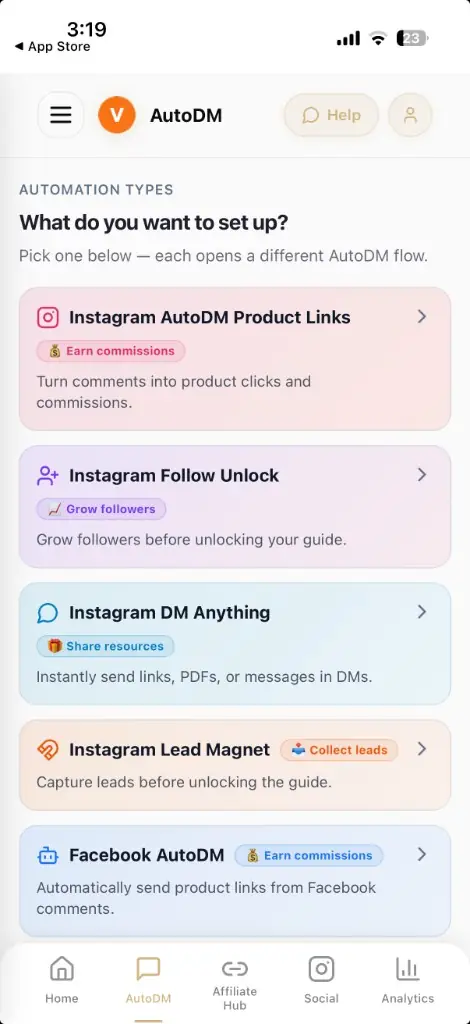
Step 1: Open AutoDM and Choose Product Links
Open the Vyral app and go to the AutoDM tab. You'll see automation types including:
For Myntra Glam Clan, choose Instagram AutoDM Product Links-built for sending affiliate product cards automatically.
Step 2: Create a New AutoDM
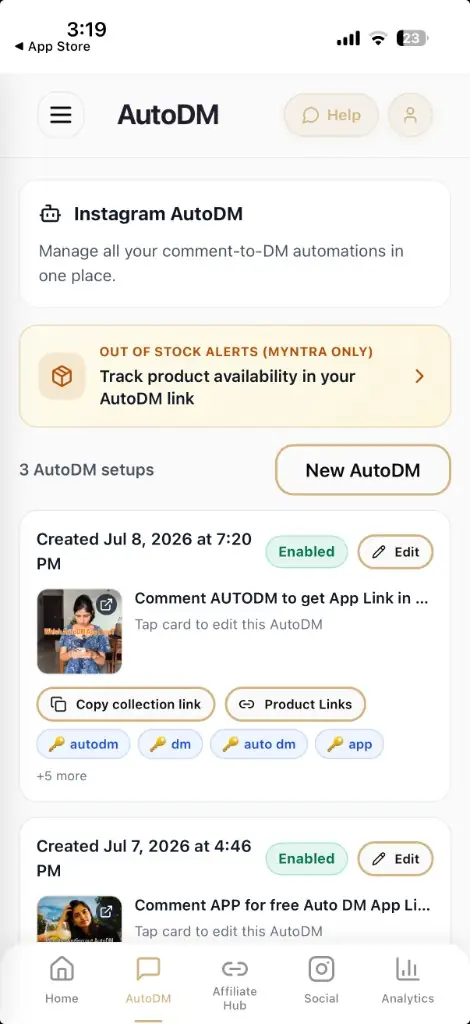
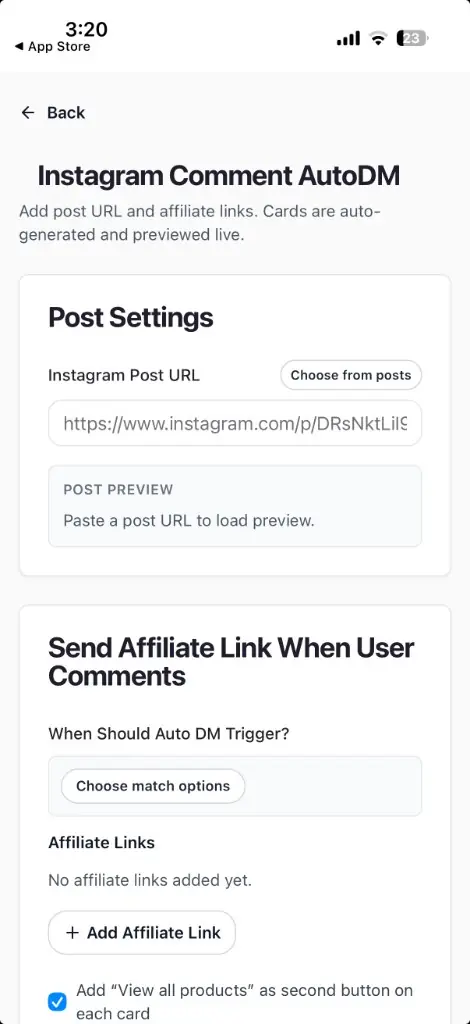
Tap New AutoDM (or Set Up AutoDM if this is your first setup). This opens the Instagram Comment AutoDM screen, where you'll configure:
Step 3: Select Your Instagram Reel
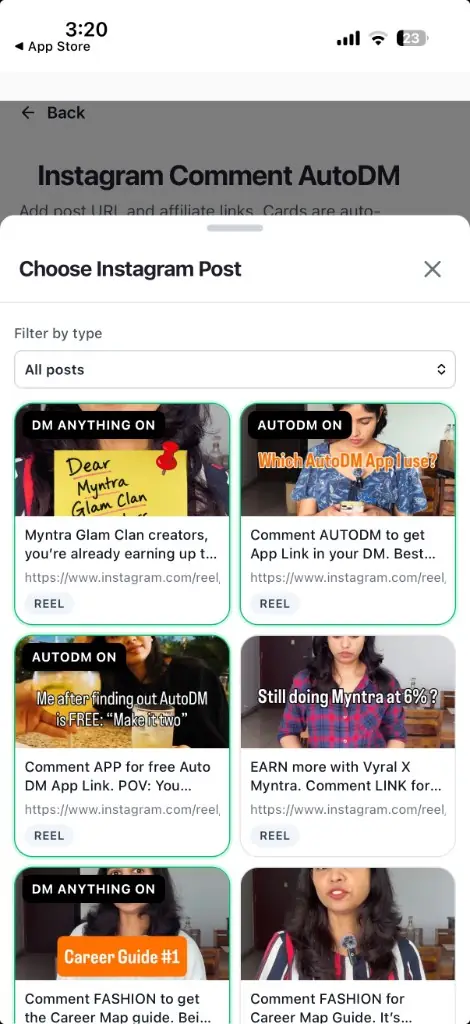
Inside Post Settings, pick the Reel where AutoDM should run:
- Paste your Instagram Reel URL, or
- Tap Choose from posts and select from your connected Instagram posts
Once selected, you'll see a live post preview.
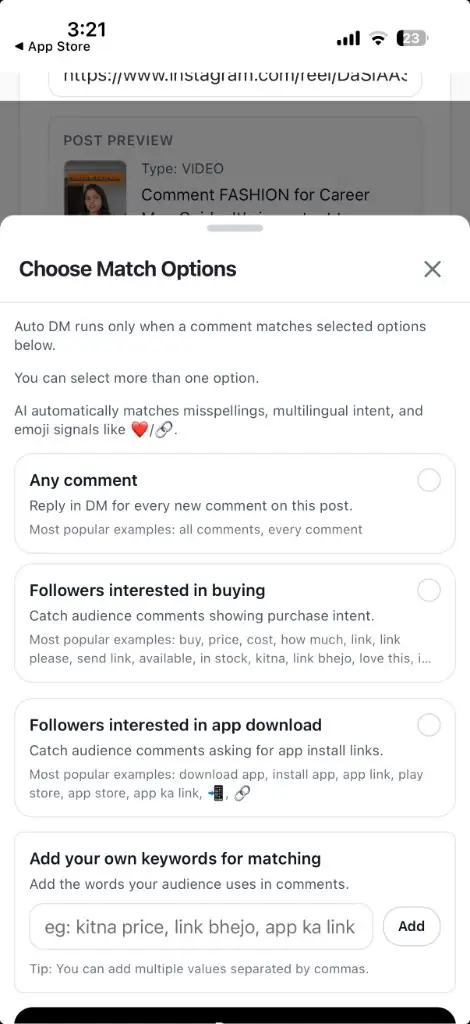
Step 4: Choose When AutoDM Should Trigger
Decide which comments should receive your affiliate links. For fashion and shopping Reels, start with buying intent.
Followers interested in buying
Best default for Myntra Glam Clan. Detects shopping intent automatically-including spelling mistakes and multilingual comments-so you don't need every variation by hand.
Custom keywords
Add your own trigger words for campaigns like "Comment LINK" or outfit-specific prompts:
Any comment
Every new comment receives your AutoDM. Useful for campaigns like "Comment LINK" or "Comment SHOP" where you want maximum coverage.
Step 5: Add Your Myntra Affiliate Links
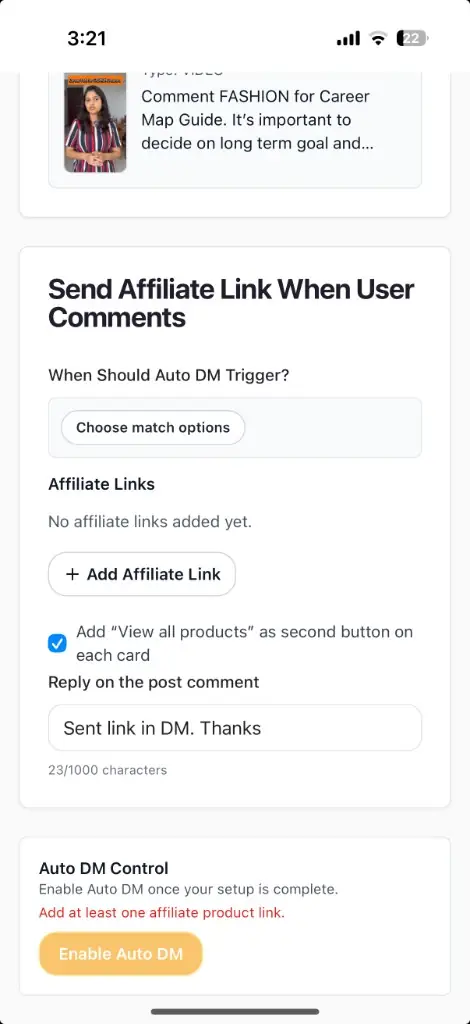
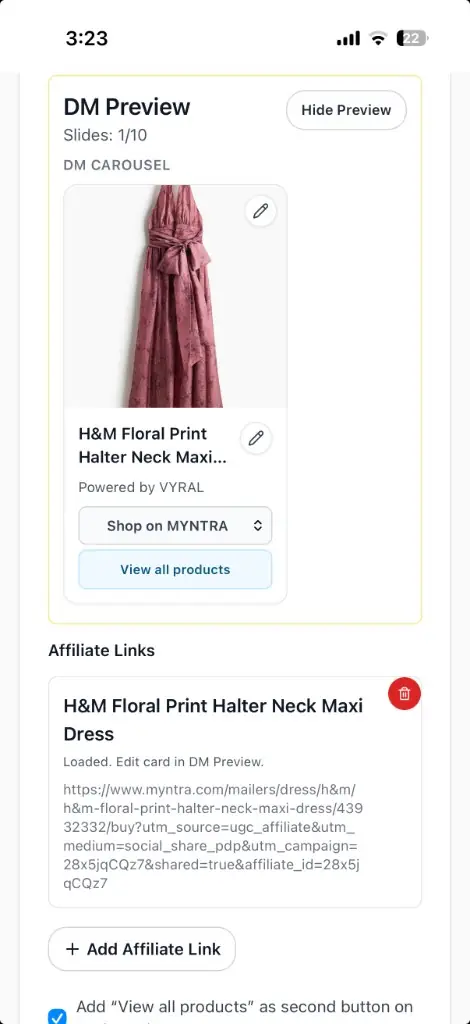
Tap Add Affiliate Link and paste your Myntra affiliate product URL. Vyral generates a shopping card with:
Featuring multiple products in one Reel? Add more affiliate links. Each product appears as a swipeable carousel inside Instagram DM-much clearer than a plain text link.
Step 6: Customize Your Public Reply
When someone comments, you can automatically post a public reply so they know to check their messages. In the app this field is labeled Reply on the post comment.
Example reply
"Sent link in DM. Thanks"
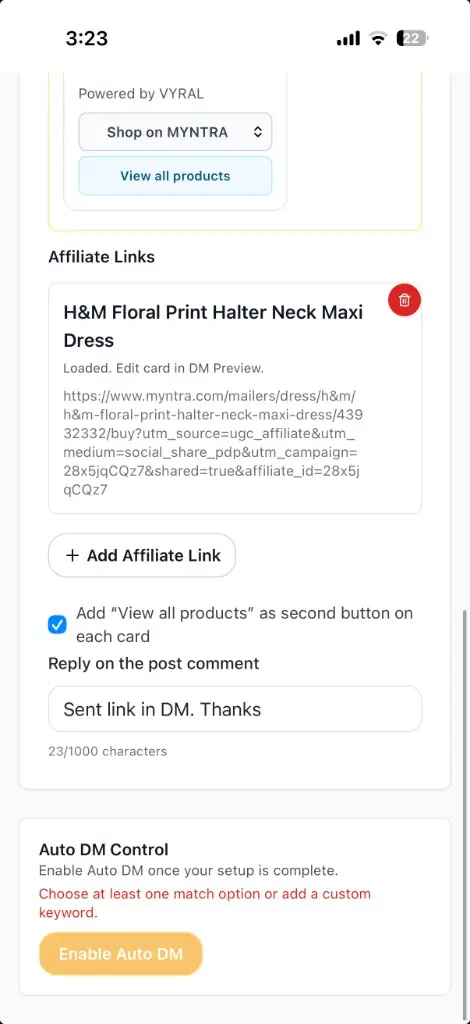
Step 7: Preview and Enable AutoDM
Review the live DM preview before going live-confirm product images, titles, and CTAs look right. Then tap Enable Auto DM.
Your automation is live. Matching comments on that Reel get shopping links in Instagram DM automatically-no manual replies needed.
Example Workflow
A viewer watches your Reel featuring three dresses and comments Link please. Within seconds they receive a DM with:
Dress 1
Shop on MYNTRA
Dress 2
Shop on MYNTRA
Dress 3
Shop on MYNTRA
Each card includes a direct Shop on MYNTRA button-the same product card layout you previewed before enabling AutoDM. The viewer can open the product immediately, improving purchase odds while ensuring you never miss a potential commission.
Why Vyral for Myntra Glam Clan
Myntra Glam Clan handles the affiliate program and commissions (up to 12%). It does not ship Instagram AutoDM, DM product cards, or other creator tools. Vyral is built for that missing layer-so affiliate creators can monetize product recommendation content without manual inbox work.
Whether you're sharing fashion hauls, styling videos, beauty finds, footwear, or accessories, Vyral helps turn Instagram engagement into Glam Clan commissions Myntra pays-and tools Myntra doesn't provide.
Frequently Asked Questions
Does AutoDM work with Myntra Glam Clan?
Yes. You can use Vyral to automatically send your Myntra affiliate links whenever someone comments on your Instagram Reel. Myntra Glam Clan itself does not include AutoDM or other creator tools-Vyral fills that gap.
How much commission can I earn with Myntra Glam Clan?
Myntra Glam Clan creators can earn up to 12% affiliate commission on eligible fashion sales. AutoDM helps you capture more of those commissions by delivering product links the moment someone asks.
Does Myntra provide AutoDM or creator tools?
No. Myntra Glam Clan provides the affiliate program and commission structure, but it does not provide Instagram AutoDM, product cards in DMs, or other creator automation tools. Creators use apps like Vyral for that workflow.
Can I send multiple Myntra products in one DM?
Yes. Add multiple affiliate links and Vyral creates a swipeable product carousel automatically.
Can I choose my own keywords?
Yes. Along with AI-powered matching like “Followers interested in buying,” you can add custom keywords such as LINK, SHOP, DRESS, or any phrase your audience uses.
Will AutoDM reply instantly?
Yes. Once enabled, Vyral automatically sends the DM within seconds after a matching comment is posted.
Does Vyral AutoDM work with Myntra Glam Clan?
Vyral is designed specifically for Indian creators and affiliate marketers. It supports comment-to-DM automation with product cards, intelligent keyword matching, and affiliate-focused workflows-making it a strong choice for Myntra Glam Clan creators who need tools Myntra does not provide.
Final Thoughts
Myntra Glam Clan can pay up to 12% commission-but Myntra doesn't give you AutoDM or other creator tools to convert Reel comments into clicks. The more comments your Reels receive, the harder manual replies become. AutoDM removes that bottleneck by instantly delivering your affiliate links to interested viewers.
Vyral AutoDM fills the tools gap Myntra does not provide: automate product sharing, cut manual effort, and send Myntra affiliate links when followers comment on your Reels. That can translate into more of those up-to-12% commissions on eligible sales.
Turn Myntra Reel Comments Into Affiliate Clicks
Glam Clan pays up to 12%-but not AutoDM. Download Vyral to send product cards automatically when viewers ask for the link.